
When you set a reader group restriction on a category, all of the subcategories and articles within that category automatically inherit those same reader groups. We call these Inherited Reader Groups. You can think of these as "automatic" reader groups: you set the reader groups once at the category level and then you can kind of forget about those groups in subcategories or articles within the category.
Once a category has reader groups assigned to it, all subcategories or articles within that category must use at least one of those reader groups. But you can refine the subcategories or articles so that they only use a subset of the groups.
The information below varies based on whether you're using our 2026 new editor or old editor.
To figure out which instructions to follow:
- Open any article for editing.
- If the lefthand navigation is collapsed and there's a link near the top of the page to Switch to old editor, follow the New editor documentation.
- If the lefthand navigation is expanded and the top of the editor and the righthand column have a heavier grey background, follow the Old editor documentation.
Here are side-by-side examples of the new editor and the old editor:
 Sample New editor
 Sample Old editor
Try out the new editor
We'd love your feedback on the new editor. To switch to the new editor, open any article for editing and select the Switch to new editor link at the top of the editor.
Inherited groups in new article editor
All reader groups an article's restricted to show up in the Read access section of the new article editor:

To determine if these are inherited reader groups:
- Select any of the text next to Read access to open the Read access modal.
- If the Read access section originally read Limited to specific reader groups and the Read access modal options include All readers, these aren't inherited restrictions.
 Sample Read access modal with Limited to specific reader groups option
 - If the Read access section originally read Limited to specific reader groups and the Read access modal options include All category reader groups, this article is inheriting reader group restrictions from its category:
 Sample Read access modal with All category reader groups option
- If All category reader groups is selected, the article is using all of the reader group restrictions it's inheriting from the category.
- If Limited to specific category reader groups is selected, the article is restricted to a subset of its inherited reader groups.


Inherited groups in category and old article editor
Any reader groups that a subcategory or an article in the old article editor is inheriting are shown in the Inherited Restrictions section.
There's also an up arrow icon in the Restrict Viewing to Reader Groups list to identify inherited groups:
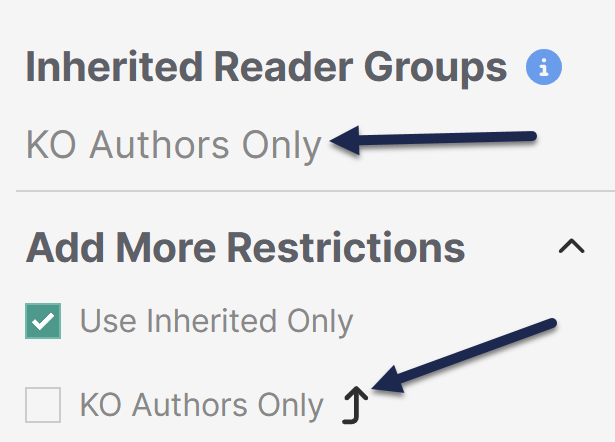 Inherited Reader Groups will have an up arrow in the Add More Restrictions section
You can't fully remove these inherited groups, though you can refine them. You can add additional groups in the Add More Restrictions section, but you can't remove any of the inherited reader groups.
If you do add a group in the Add More Restrictions section, a reader must belong to that group as well as the Inherited Reader Groups. Refer to Content with multiple reader groups for more information on this setup.