
Snippets are chunks of reusable content or code that can be placed within articles, categories, and even your theme's HTML. The content of the snippet can be as simple as a single word or sentence, or as complex as a JavaScript function that performs an action on whatever page it is used.
For example, you could create a snippet that contains your company's copyright information. Wherever you want the copyright to appear, instead of typing it out again and again, you would use the snippet's merge code in its place.
When the page displays, the snippet merge code is replaced with the snippet's content. When you need to update your copyright information, you can edit and update the snippet content, and the changes will be automatically reflected wherever the snippet was used.
Text within snippets is not indexed for search.
Not all content reuse should be a snippet
If you have a chunk of content that you'd like to reuse but that also makes sense as a stand-alone article, consider using topic articles instead.
Refer to Snippet use cases for more ideas on how you can use snippets in your knowledge base today!
Snippets page
All created snippets are stored in the Snippets page, accessible in the left navigation:
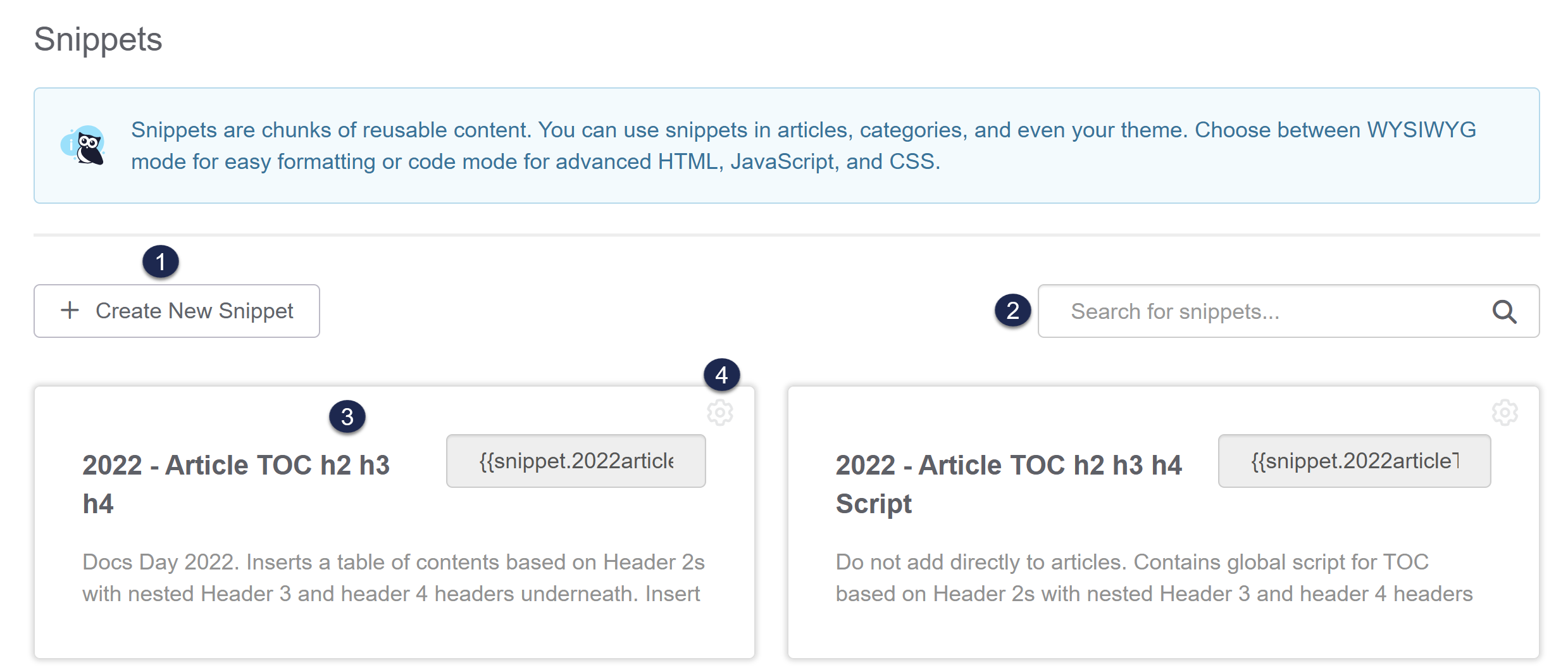 Sample snippet page layout
Within the Snippets page, you can:
- Create new snippets.
- Search for existing snippets using words in the snippet's Name or Description.
- Select any snippet to open it in edit mode.
- Copy or delete a snippet by selecting the gear cog icon in the upper right corner of the snippet's card.
Alphabetical, case sensitive sorting
The Snippets page is sorted alphabetically and is case sensitive. All snippets beginning with upper case letters will appear first, in alphabetical order, followed by all snippets beginning with lower case letters, also in alphabetical order.
Get started with snippets
To start using snippets:
- Follow the instructions in Set up snippets to learn how to create, edit, copy, and delete snippets.
- Review our Snippet best practices for use cases, best practices on using and formatting snippets, and a snippet standardization checklist template.
- Start adding or removing snippets in your articles or knowledge base theme by following the instructions in Use snippets in content.