
Your KnowledgeOwl knowledge base comes with comments turned on across the knowledge base. New articles will automatically have comments turned on so your readers can submit questions or feedback.
You can disable comments for certain articles. This action removes the comments section from the article completely.
The information below varies based on whether you're using our 2026 new editor or old editor.
To figure out which instructions to follow:
- Open any article for editing.
- If the lefthand navigation is collapsed and there's a link near the top of the page to Switch to old editor, follow the New editor documentation.
- If the lefthand navigation is expanded and the top of the editor and the righthand column have a heavier grey background, follow the Old editor documentation.
Here are side-by-side examples of the new editor and the old editor:
 Sample New editor
 Sample Old editor
Try out the new editor
We'd love your feedback on the new editor. To switch to the new editor, open any article for editing and select the Switch to new editor link at the top of the editor.
Disable article comments in new editor
To disable article comments for a specific article in the new editor:
- Open the article for editing.
- In the Other section, select anywhere in the Enabled text next to Comments:
The comments modal opens. Select anywhere in the Enabled text next to Comments
 - Select Disabled:
 Select Disabled
 - Once you make your selection, the modal closes.
- Be sure to Save your article changes.


The comments section won't be shown in this live article.
If you'd prefer to disable comments completely across your entire knowledge base, refer to the instructions in Turn off comments in your knowledge base.
Disable article comments in old editor
To disable article comments for a specific article in the new editor:
- Open the article for editing.
- In the Display Settings section, check the box to Remove comment ability.
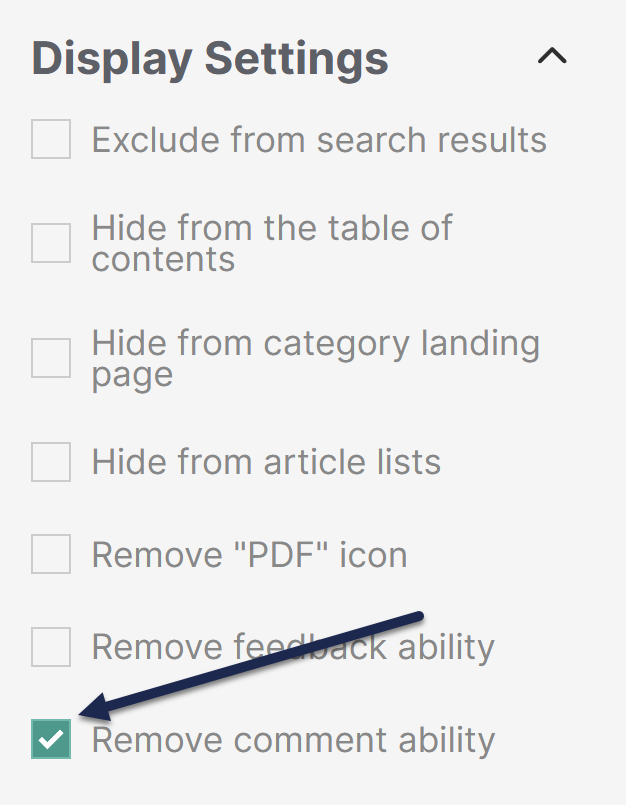 Check the box to Remove comment ability
 - Be sure to Save your article changes.
The comments section won't be shown in this live article. Refer to Display Settings for more information about the other settings in this section.
If you'd prefer to disable comments completely across your entire knowledge base, refer to the instructions in Turn off comments in your knowledge base.