
Use Customize > Default text to change KnowledgeOwl's default wording to better match your organization. Refer to Customize default text overview for more information on using this feature overall; refer to Add and remove customized text strings for instructions on editing text strings.
On this page, we walk through all of the Article Lists Default Text Strings available with accompanying screenshots to show how they're used. Refer to Add or remove article lists for more information on working with article lists.
Default text string references
Here's a list of all the Default Text strings available in the Article Lists Knowledge Base Section:
| Default Text String | Description | Additional notes/description | Screenshot References |
|---|---|---|---|
| Popular Articles | Popular articles list heading | This is the heading for the Popular Articles list where it is displayed. If you have a knowledge base created before September 2023, you'll also need to update either the top-level Customize > Homepage or Customize > Style to recognize this text change. Refer to Update Style Settings with Customize Text merge code for more details. | Homepage Default Article Lists screenshots, #1 |
| Popular Articles | Popular articles page heading | The heading displayed on the full Popular Articles page (/{root}/popular-articles). This page is opened when someone selects the See more... link in the Popular Articles list. | Popular Articles screenshot, #1 |
| See more... | Popular articles see more | The text displayed at the bottom of the Popular Articles list when it contains more articles than can be displayed. | Homepage Default Article Lists screenshots, #2 |
| None | Popular articles empty text | The text that is displayed if the Popular Articles list is shown but has no articles within it. | Homepage Default Article Lists screenshots, #7 |
| New Articles | New articles list heading | This is the heading for the New Articles list where it is displayed. If you have a knowledge base created before September 2023, you'll also need to update Customize > Style to recognize this text change. Refer to Update Style Settings with Customize Text merge code for more details. | Homepage Default Article Lists screenshots, #3 |
| New Articles | New articles page heading | The heading displayed on the full New Articles page (/{root}/new-articles). This page is opened when someone selects the See more... link in the New Articles list. | New Articles screenshot, #1 |
| See more... | New articles see more | The text displayed at the bottom of the New Articles list when it contains more articles than can be displayed. | Homepage Default Article Lists screenshots, #4 |
| None | New articles empty text | The text that is displayed if the New Articles list is shown but has no articles within it. | Homepage Default Article Lists screenshots, #8 |
| Updated Articles | Updated articles list heading | This is the heading for the Updated Articles list where it is displayed. If you have a knowledge base created before September 2023, you'll also need to update Customize > Style to recognize this text change. Refer to Update Style Settings with Customize Text merge code for more details. | Homepage Default Article Lists screenshots, #5 |
| Updated Articles | Updated articles page heading | The heading displayed on the full Updated Articles page (/{root}/updated-articles). This page is opened when someone selects the See more... link in the Updated Articles list. | Updated Articles screenshot, #1 |
| See more... | Updated articles see more | The text displayed at the bottom of the Updated Articles list when it contains more articles than can be displayed. | Homepage Default Article Lists screenshots, #6 |
| None | Updated articles empty text | The text that is displayed if the Updated Articles list is shown but has no articles within it. | Homepage Default Article Lists screenshots, #9 |
| Recent Articles | Recent articles heading | This is the heading for the Recent Articles list where it is displayed. This article list is not automatically added to new knowledge bases. If you've added the list yourself, you may need to update Customize > Homepage or Customize > Style to recognize this text change. Refer to Update Style Settings with Customize Text merge code for more details. | Optional Article Lists screenshot, #1 |
| None | Recent articles empty text | The text that is displayed if the Recent Articles list is shown but has no articles within it. | Optional Article Lists screenshot, #2 |
| Favorite Articles | Favorite articles heading | This is the heading for the Favorite Articles list where it is displayed. This article list is not automatically added to new knowledge bases. If you've added the list yourself, you may need to update Customize > Homepage or Customize > Style to recognize this text change. Refer to Update Style Settings with Customize Text merge code for more details. | Optional Article Lists screenshot, #3 |
| Favorite Articles | Favorite articles page heading | The heading displayed on the full Favorite Articles page (/{root}/favorite-articles). This page is opened when someone selects the See more... link in the Favorite Articles list. | Favorite Articles screenshot, #1 |
| See more... | Favorite articles see more | The text displayed at the bottom of the Favorite Articles list when it contains more articles than can be displayed. | Optional Article Lists screenshot, #5 |
| None | Favorite articles empty text | The text that is displayed if the Favorite Articles list is shown but has no articles within it. | Optional Article Lists screenshot, #4 |
| Last Updated: | Popular articles last updated label | This wording introduces the last updated date for each article in the Popular Articles page. If you've customized your Search results text strings to replace Last Updated, we recommended matching those changes here. | Popular Articles screenshot, #2 |
| Last Updated: | Updated articles last updated label | This wording introduces the last updated date for each article in the Updated Articles page. If you've customized your Search results text strings to replace Last Updated, we recommended matching those changes here. | Updated Articles screenshot, #2 |
| Created On: | New articles created on label | On the New Articles page, this wording introduces the creation date for each article. If you've customized your Search results text strings to replace Created On, we recommended matching those changes here. | New Articles screenshot, #2 |
| Published On: | New articles published on label | On the New Articles page, this wording introduces the published date for each article. This text is only shown if a published date has been explicitly added to an article AND if that date is more different from the date the article was created. | New Articles screenshot, #3 |
| More | Article list pagination next button label | When the New, Popular, or Updated Articles page contain more articles than they can hold, this is the label for the control that navigates to the next page. | Article List Pagination screenshot, #4 |
| Back | Article list pagination previous button label | When the New, Popular, or Updated Articles page contain more articles than they can hold, this is the label for the control that navigates to the previous page. | Article List Pagination screenshot, #1 |
| Viewing | Article list current page label | When the New, Popular, or Updated Articles page contain more articles than they can hold, this is the label to indicate which articles in the list you're currently viewing. | Article List Pagination screenshot, #2 |
| of | Article list current page preposition | When the New, Popular, or Updated Articles page contain more articles than they can hold, this is the label to offset what you're currently viewing from the total number of articles. | Article List Pagination screenshot, #3 |
Homepage Default Article Lists screenshots
By default, new knowledge bases are created with the Popular Articles, New Articles, and Updated Articles sections on the homepage:
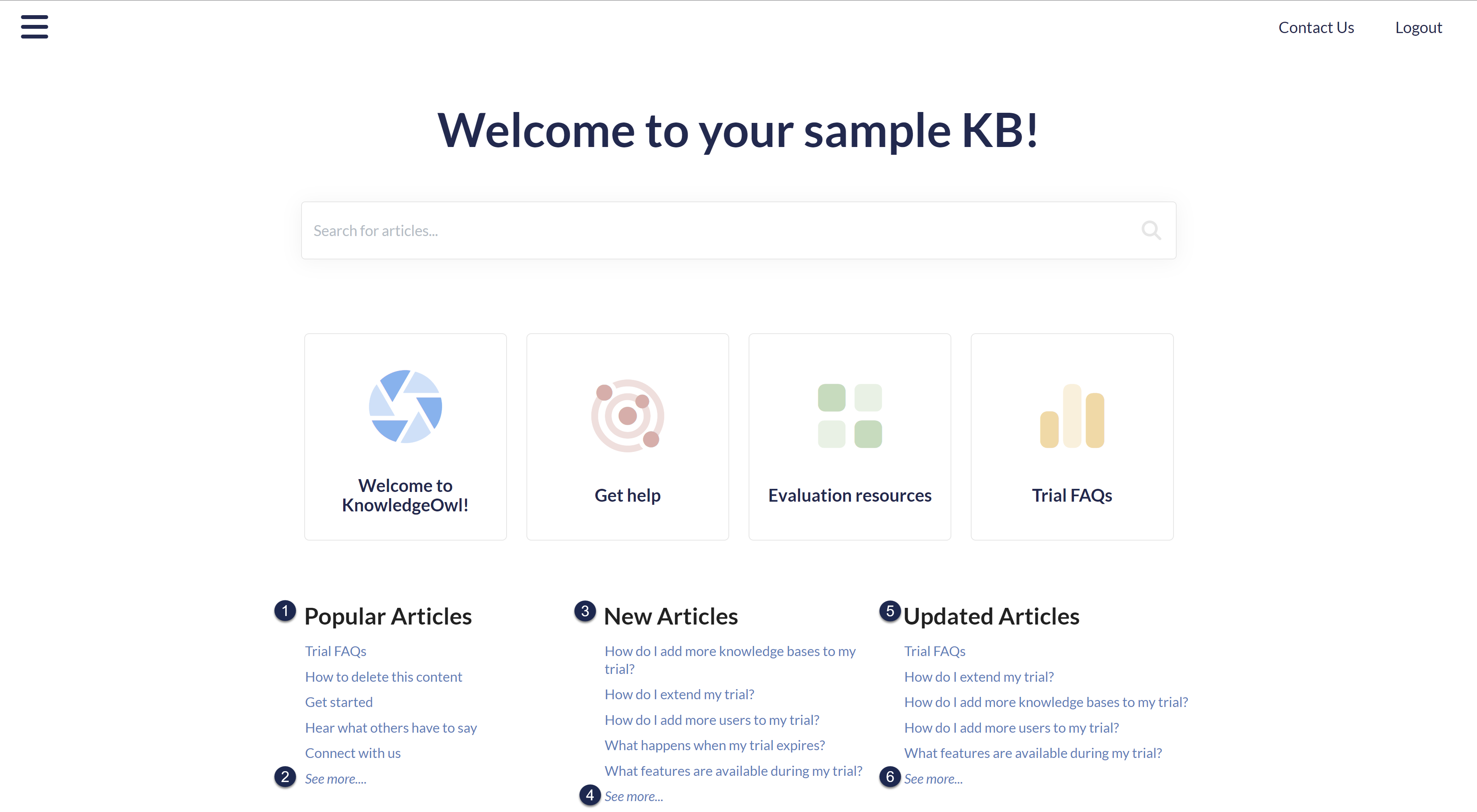 Homepage Default Article Lists, populated
Related changes
#1, #3, and #5 (the titles for each list) may require some updates to Customize > Style or Customize > Homepage. Refer to Update Style Settings with Customize Text merge code and Update Homepage with Customize Text merge code for more details.
 Homepage Default Article Lists, empty
Optional Article Lists screenshot
The Favorite Articles and Recent Articles lists aren't included in your knowledge base by default, but you can choose where to add them. Both lists require individual reader logins to work.
Here's an example of what they'd look like added to your homepage, with the corresponding text strings numbered, when the lists contain nothing:
 Optional Article Lists, empty
Readers can favorite up to 50 articles; the list displays only up to 10. If the reader's favorited more than 10 articles, a See more... link is displayed:
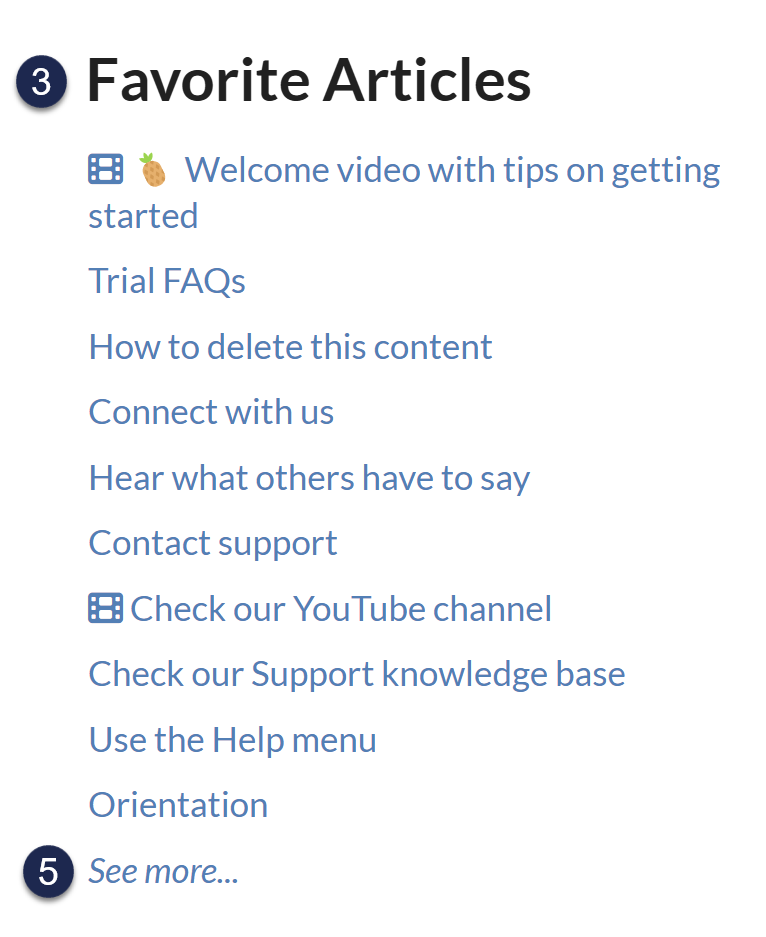 Favorite Articles list, populated
Popular Articles screenshot
Once you select the See more... link in the Popular Articles list (or navigate to /{root}/popular-articles in your knowledge base), you're presented with the full Popular Articles page:
 Popular Articles page
Updated Articles screenshot
Once you click the See more... link in the Updated Articles list (or navigate to /{root}/updated-articles in your knowledge base), you're presented with the full Updated Articles page:
 Updated Articles page
Preposition changes
To change the "in" used between the date and the category breadcrumb, update the "in" default text string in the Search section.
New Articles screenshot
Once you select the See more... link in the New Articles list (or navigate to /{root}/new-articles in your knowledge base), you're presented with the full New Articles page:
 New Articles page
Preposition changes
To change the "in" used between the date and the category breadcrumb, update the "in" default text string in the Search section.
Favorite Articles screenshot
Once you select the See more... link in the Favorite Articles list (or navigate to /{root}/favorite-articles in your knowledge base), you're presented with the full Favorite Articles page:
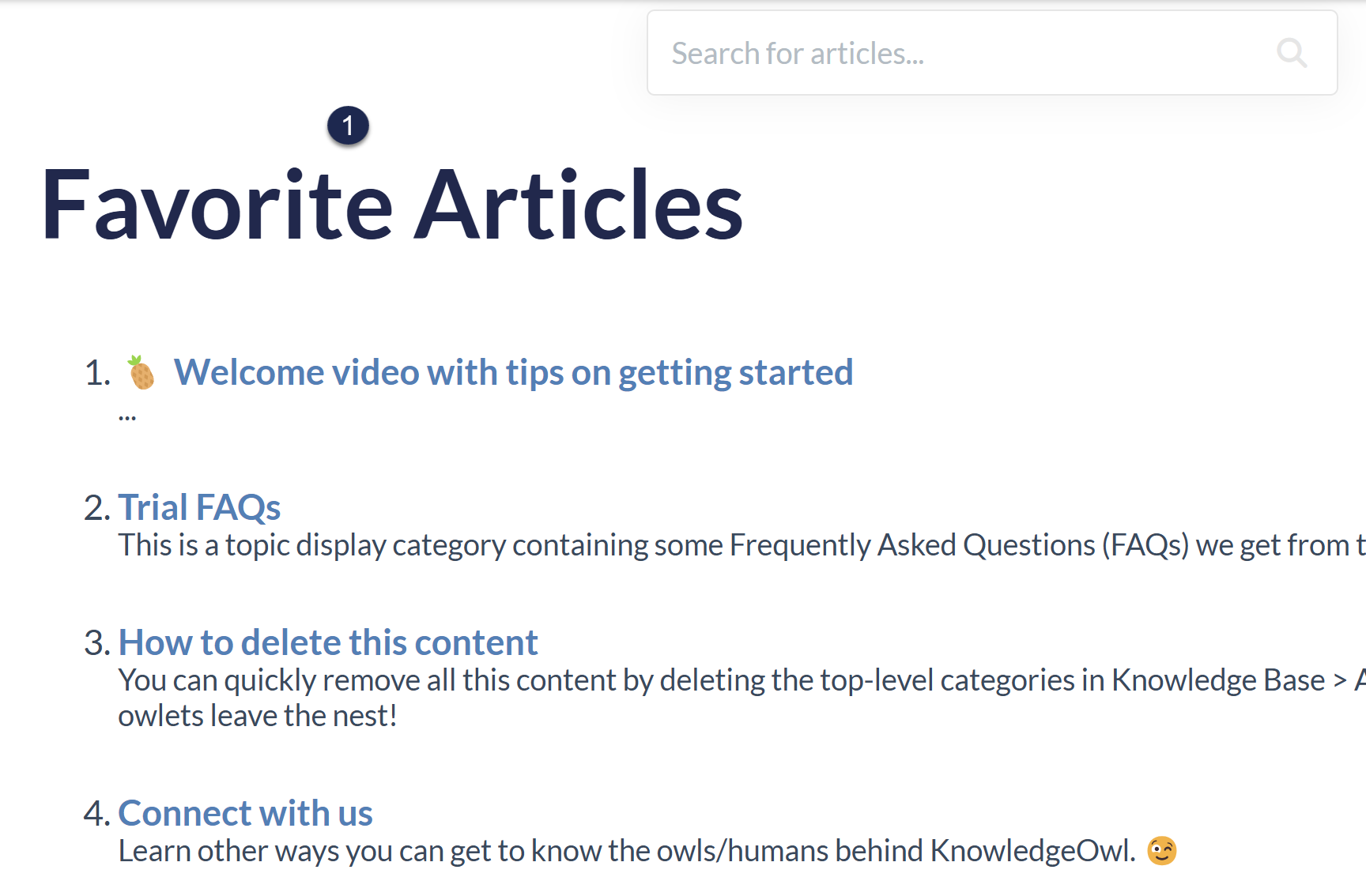 Favorite Articles page
Article List Pagination screenshot
The full page for the Popular, Updated, or New Articles pages displays pagination controls at the bottom if there are more than 10 articles on the page. The text strings here allow you to customize the text associated with those controls.
 Update the text strings here to customize the pagination control text labels