
If you've scheduled an article to be published or scheduled an article to be archived, the only way to edit that schedule is to remove it entirely and create a new one.
You might also want to remove the article's schedule completely.
In both situations, you'll first need to remove the existing schedule.
The information below varies based on whether you're using our 2026 new editor or old editor.
To figure out which instructions to follow:
- Open any article for editing.
- If the lefthand navigation is collapsed and there's a link near the top of the page to Switch to old editor, follow the New editor documentation.
- If the lefthand navigation is expanded and the top of the editor and the righthand column have a heavier grey background, follow the Old editor documentation.
Here are side-by-side examples of the new editor and the old editor:
 Sample New editor
 Sample Old editor
Try out the new editor
We'd love your feedback on the new editor. To switch to the new editor, open any article for editing and select the Switch to new editor link at the top of the editor.
To remove or update a schedule in the new article editor:
- Open the article in the article editor.
- Hover over the Scheduled to be... text just under the Status:
 Scheduled for publish trashcan icon
 Scheduled for archive trashcan icon
 - Select Remove. The Remove archive date or Remove schedule date modal opens. You can't undo removing a schedule, so be sure you're ready to make this change.
- Select Remove to confirm removal of the scheduled date. A confirmation will slide out in the lower left of the editor.
- If you'd like to set a new schedule, follow the steps to add one. Refer to Schedule an article to be published and Schedule an article to be archived, respectively.


To remove or update a schedule in the old article editor:
- Open the article in the article editor.
- Look for the text in the righthand column that provides details on the scheduled archival/publication. The wording is slightly different for each, but the format and location are the same, directly underneath the Publishing Status dropdown.
- Select the trashcan icon to the right of the "Scheduled for..." statement:
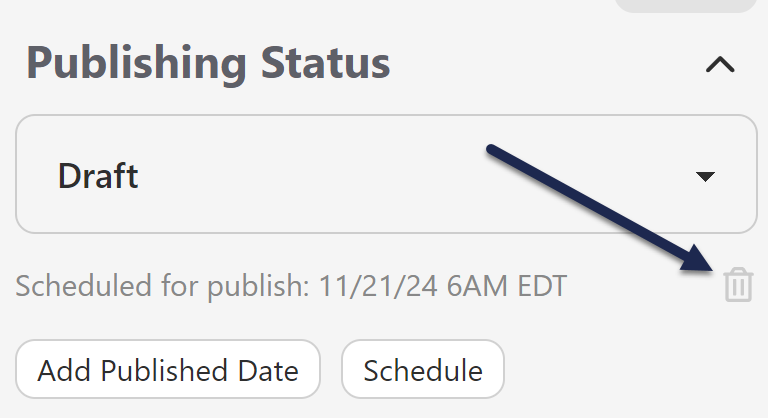 Scheduled for publish trashcan icon
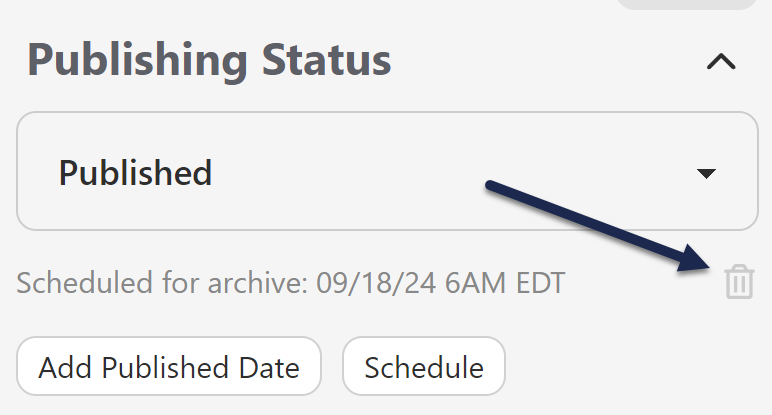 Scheduled for archive trashcan icon
 - This will automatically remove the scheduled archival or publication from the article.
- If you'd like to set a new schedule, follow the steps to add one. Refer to Schedule an article to be published and Schedule an article to be archived, respectively.
